

A QR code on a poster sounds simple enough. Someone scans it, gets your event details, done. But for organisations that run regular events – venues, schools, NPOs, city offices, trade halls – the practical reality is messier. Event details change. Dates shift. Speakers drop out. Venues move. And every time that happens, every printed poster, flyer, and banner carrying that QR code becomes a liability.
This guide covers how to use QR codes for event communication properly: where they work, where they don’t, the critical difference between static and dynamic codes, and how to set up a system where the QR code never needs reprinting – even when the event changes.
Why QR codes work well for event communication
QR codes bridge the gap between physical materials and live digital information. That gap matters for events more than almost any other communication context – because events are time-sensitive, detail-heavy, and subject to last-minute changes.
For organisations communicating events across both print and digital channels, QR codes serve three distinct purposes:
- Discovery – a poster or flyer at a venue, on a noticeboard, or in a window can carry a QR code that takes a passerby directly to the full event details without requiring them to search, type a URL, or remember anything.
- Depth – print materials have limited space. A QR code lets you keep the poster visually clean while offering a scan-to-reveal layer with description, location map, photos, booking link, and add-to-calendar option.
- Distribution – a QR code on a screen, in an email signature, or printed on a receipt extends your event communication to places where a full calendar widget would not fit.

The problem most organisations run into is not that QR codes don’t work – it’s that they set them up in a way that creates more maintenance work than it saves.
The reprinting problem: static vs dynamic QR codes
Most QR codes generated by free online tools are static. The destination URL is encoded directly into the code at the moment of creation. If you change the URL – or if the event details at that URL change – the code itself is unaffected, but anyone scanning it may land on outdated or incorrect information. If the URL no longer works, the code is simply broken.
For a one-off event with a fixed date and a stable URL, a static QR code is fine. For organisations running ongoing events – a monthly programme, a weekly schedule, a season of activities – static codes create a reprinting cycle that quickly becomes expensive and error-prone.
The alternative is a dynamic QR code: the code points to a persistent URL that you control, and the content at that URL updates automatically when event details change. The physical code stays the same. The information it delivers stays current.
With a static QR code, a change in event details means a reprint. With a dynamic code, the printed material stays valid – the destination updates automatically.
Here is a direct comparison of how the two approaches behave across the situations that matter most for event communication:
| Static QR code | Dynamic / Revisual QR code | |
| Destination URL | Fixed at creation | Updateable at any time |
| Event details change | Reprint required | No reprint – same code, new info |
| Cost per event change | Reprinting + redistribution | Zero |
| Tracks scans | No | Yes – by date |
| Works on printed materials | Yes | Yes |
| Branded design | Limited | Yes – matches your visual identity |
| Links to hosted event page | Static URL only | Live Revisual event page |
| Multiple events, one code | No | Yes – use calendar QR for full schedule |
The reprinting column is the one that drives the real cost difference. For an organisation that updates event details regularly – adjusting times, adding speakers, changing venues – a static QR code on printed materials means either accepting that some of your audience will see incorrect information, or reprinting every time something changes. Neither is a good option.
Where to place QR codes in your event communication
QR codes for event communication work best at the point of physical attention – places where your audience is already present, already engaged, and holding a phone. That is a narrower set of contexts than it might seem.
High-value placements
- Event posters and flyers – the classic use case. A QR code on a poster in a venue, library, community centre, or shop window reaches people who are physically present in a relevant space. Keep the code large enough to scan comfortably at arm’s length – at least 3cm × 3cm in print.
- Noticeboards and information boards – organisations with a fixed physical location (schools, venues, public buildings) can use a single permanent QR code on a noticeboard that always shows the current event schedule. Because the destination updates automatically, the physical code never needs to be replaced.
- Printed welcome materials – hotels, resorts, and venues that produce guest welcome brochures or in-room leaflets face a familiar problem: the brochure is printed in bulk, but the events and experiences it promotes change weekly or seasonally. A single QR code placed in the brochure – ‘Scan to see what’s on during your stay’ – links to a live calendar that always reflects the current programme. The brochure never goes out of date, print runs stay economical, and guests always see accurate information regardless of when the brochure was produced.
- Digital displays and kiosks – a QR code on a screen or kiosk at the entrance of a venue lets visitors scan to get the full event programme on their phone. Useful in contexts where the display itself has limited space or poor readability at distance.
- Printed programmes and schedules – a QR code in a printed programme links to the live version, which may have been updated since printing. This is particularly valuable for multi-day events where the schedule evolves.
- Email footers and signatures – a small QR code in an email footer or staff signature, linking to your full event calendar, reaches people who are already in a communication relationship with your organisation.
Lower-value placements to approach with caution
- Social media posts – your audience on social media is already on a device. A QR code in a social post adds a scan step that a direct link does not. Use links instead of QR codes for digital-only distribution.
- Email body (not footer) – same logic. A link is easier to tap than a QR code is to scan from a screen. QR codes in email bodies are a common mistake – they solve a problem that does not exist in that context.
- Very small formats – business cards, stickers, or materials where the code would print at under 2cm × 2cm. Scan reliability drops significantly at small sizes.
What your QR code should link to
The destination matters as much as the placement. A QR code that links to your homepage, a Facebook event, or a generic contact page wastes the scan. The person who scanned it wants event information – give them that directly.
The best destinations for event QR codes, in order of effectiveness:
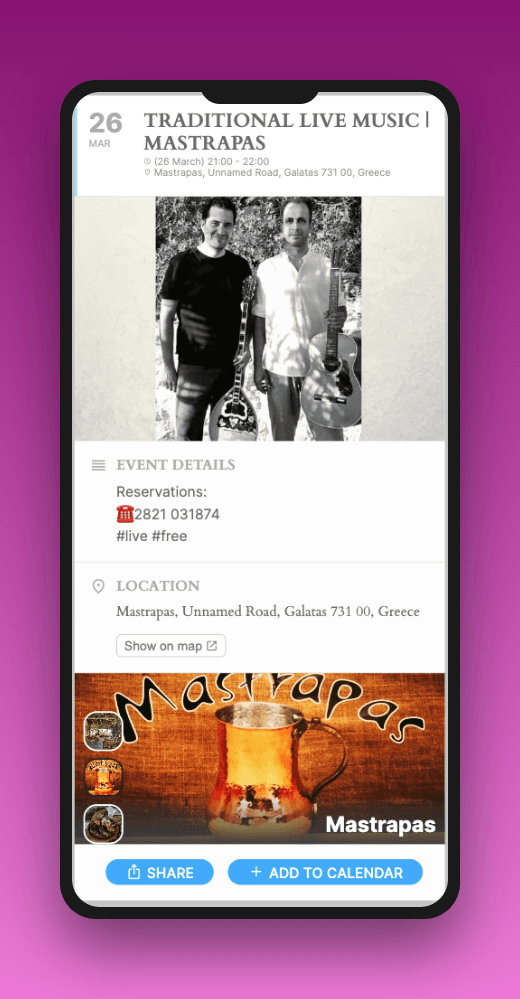
- A hosted event page – a dedicated page for the specific event, with full details, images, location map, and an add-to-calendar button. This is the highest-converting destination because it matches the intent of the scan exactly.
- A live event calendar – if the QR code is on permanent materials (a noticeboard, a window sticker, a recurring poster template), link to your full event schedule rather than a single event. The viewer gets the current programme regardless of when they scan.
- A filtered calendar view – for organisations with diverse event types, a QR code on a sports programme should link to a calendar filtered to sports events, not the full organisation calendar. Relevance at the point of scan matters.
What to avoid: linking to a PDF, a social media profile, or a page that requires login. All of these create friction between the scan and the information.
How Revisual handles QR codes for events
Revisual auto-generates a QR code for every event in your calendar. You do not create them manually – they exist automatically as soon as an event is in your Google Calendar and synced to Revisual.
Each QR code links to a hosted event page that Revisual maintains. When you update the event in Google Calendar – changing the time, updating the description, adding a location – the hosted page updates automatically. The QR code does not change. Any printed material carrying it continues to work and continues to deliver accurate information.
This is the mechanism that eliminates the reprinting cycle. The QR code is not a link to a static page you created – it is a persistent pointer to a live data source. The physical code and the event information are decoupled, which means they can each be updated independently.

Beyond individual event QR codes, Revisual also generates a QR code for your full calendar widget. This is the version to use on permanent materials – a recurring poster template, a window sticker, a noticeboard card – because it always shows your current programme regardless of which events have been added or removed since the material was printed.
For organisations that communicate events across both print and digital channels, this means your print workflow and your digital workflow can share a single source of truth: Google Calendar. Update it once, and both the website widget and the printed QR code destination reflect the change.
QR codes for event communication: frequently asked questions
Not if you’re using dynamic QR codes. With Revisual, the QR code on your poster is a persistent link – the destination updates automatically when you change the event in Google Calendar. The printed code stays valid regardless of how many times the event details change.
At minimum 3cm × 3cm for materials viewed at arm’s length. For larger-format materials like A2 or A1 posters, or displays viewed from a distance, 5–8cm is more reliable. Test by scanning a printed proof before committing to a print run – screen proofs are not a reliable test of scan performance.
Yes – link the QR code to your calendar page rather than a single event. With Revisual, your full calendar has its own QR code that always shows your current schedule. This is the right choice for permanent materials like noticeboards, venue signage, or recurring poster templates.
Static QR codes generated by free tools typically offer no scan tracking. Dynamic QR codes – including those generated by Revisual – track scans by date, which gives you a basic picture of which materials are generating engagement.
Revisual generates QR codes that link to hosted event pages styled to match your brand settings. The QR code image itself is standard – customising the visual appearance of the code (adding a logo, changing colours) requires a separate QR code design tool, which you can then point to your Revisual hosted event page URL.
Yes. Revisual’s hosted event pages exist independently of your website – they’re pages Revisual hosts for you, not pages on your site. A QR code can link directly to a Revisual hosted page without you needing a website at all. This is a useful option for organisations that communicate primarily through print and social media but want to offer a richer digital experience when someone scans a poster.
Related Reading

About the author
Piotr Pozniak
Piotr’s is the cofounder of Revisual, a dedicated tool for seamlessly sharing events. With over six years of experience developing the platform, he brings extensive expertise in streamlining business processes through technology solutions. Work with partners across industries has honed his ability to optimize event workflows and enhance data accessibility.

